不需建立View model類別即可傳遞資料
可以跨Action傳遞
- 5月 25 週三 202221:56
MVC View獲得資料的多種方法
- 5月 24 週二 202220:16
.net core 3 使用WCF

最近因要與.net framework 4 web進行串接,因舊專案都使用WCF進行資料共享,故在不想調整舊程式為Webapi時,就會需要進行WCF的套用
而.net core在進行服務連接時,因原本回傳為Datatable形式,故在進行程式碼自動建立時,會將回傳資訊轉成xml格式進行回傳
- 5月 23 週一 202222:30
IdentityServer4 in Vue3
最近開始使用open ID進行驗證認證 , 我在找尋解決方案時發現了identityserver4 得這個集大成的open ID使用 套件 , 切可以很方便擴展公司內部所使用的AD認證 或者是Google認證LINE認證等方式, 那我們就開始簡單的介紹一下identityserver4實作的方式。
- 5月 28 週四 202010:08
[JS] EasyUI Combobox require 擴展方法
筆記一下
EasyUI的Combobox擴展方法,可直讓Combobox可直接使用此方法調整require的狀態
EasyUI的Combobox擴展方法,可直讓Combobox可直接使用此方法調整require的狀態
- 5月 27 週三 202015:21
[ASP.NET][C#]下載檔案時中文檔名出現亂碼
解套方式 => HttpUtility.UrlEncode 轉碼後,傳給前端瀏覽器,瀏覽器就會自己解囉!
/// <summary>
/// OutputFile - 將檔案傳給Client端
/// </summary>
/// <param name="context">sysFiles.context</param>
/// <param name="byteFile">二進位檔</param>
/// <param name="strFileName">給User的檔名(不含附檔名)</param>
/// <param name="strFileExtension">檔案附檔名</param>
public static void OutputFile(HttpContext context, Byte[] byteFile, string strFileName, string strFileExtension)
{
if (context.Response.IsClientConnected)
{
context.Response.Clear();
context.Response.ContentType = ReturnExtension(strFileExtension);
context.Response.AddHeader("Content-Disposition", string.Format("attachment;filename={0}", HttpUtility.UrlEncode(strFileName + strFileExtension, Encoding.UTF8)));
context.Response.AddHeader("Content-Length", byteFile.Length.ToString());
context.Response.OutputStream.Write(byteFile, 0, byteFile.Length);
context.Response.Flush();
}
}
/// <summary>
/// OutputFile - 將檔案傳給Client端
/// </summary>
/// <param name="context">sysFiles.context</param>
/// <param name="byteFile">二進位檔</param>
/// <param name="strFileName">給User的檔名(不含附檔名)</param>
/// <param name="strFileExtension">檔案附檔名</param>
public static void OutputFile(HttpContext context, Byte[] byteFile, string strFileName, string strFileExtension)
{
if (context.Response.IsClientConnected)
{
context.Response.Clear();
context.Response.ContentType = ReturnExtension(strFileExtension);
context.Response.AddHeader("Content-Disposition", string.Format("attachment;filename={0}", HttpUtility.UrlEncode(strFileName + strFileExtension, Encoding.UTF8)));
context.Response.AddHeader("Content-Length", byteFile.Length.ToString());
context.Response.OutputStream.Write(byteFile, 0, byteFile.Length);
context.Response.Flush();
}
}
- 5月 25 週一 202023:34
Web deployment task failed. ('Microsoft.Web.Deployment.DeploymentManager' 的類型初始設定式發生例外狀況。)
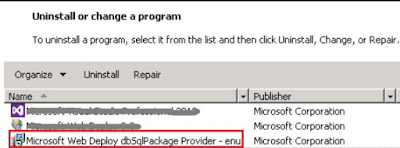
今天重灌VS2019在發不時發生以下錯誤訊息
Web deployment task failed. ('Microsoft.Web.Deployment.DeploymentManager' 的類型初始設定式發生例外狀況。)
- 5月 19 週二 202011:46
[C#] Math 四捨五入不如預期? ex 11.245 = 11.24?
今天在處理小數點四捨五入時發現
我的數值四捨五入到小數點第二位
我的數值四捨五入到小數點第二位
- 5月 11 週一 202009:42
[JS] 防止事件多次累加
最近使用到在頁面中引入不同的html元素進行顯示
在建立元素的形態時會發現click被重複繫結,導致code重覆動作
在建立元素的形態時會發現click被重複繫結,導致code重覆動作
- 12月 19 週四 201910:15
[C#] NPOI 匯出xlsx的冷門問題

這幾日遇到的C#使用 NPOI進行匯出時的問題
1. 匯出Excel的xlsx檔後,打開時MicroOffice系列打開時會提示 : 我們發現 "XXXX.xlsx"的部分內容有問題,您要我門盡可能嘗試復原嗎? 如果您信任此活頁簿的來源,請案一下[是]。
- 12月 07 週五 201800:27
[酒譜] 養生之道 Part2 (The Health Way)
先簡單記錄相關材料步驟,後面有空在補上實際調製步驟! 敬請期待~~

 IT (3)